What the validator is telling you
A PDF can hold a human-readable title, and a separate switch that tells the viewer to show that title in place of the filename. The switch is the DisplayDocTitle key. PDF/UA-1 clause 7.1 requires it to be present and set to true.
Failure 07-001 means the key is absent. Its sibling, 07-002, means the key is present and set to false. The fix is the same for both, and veraPDF reports them under one rule.
What a reader experiences
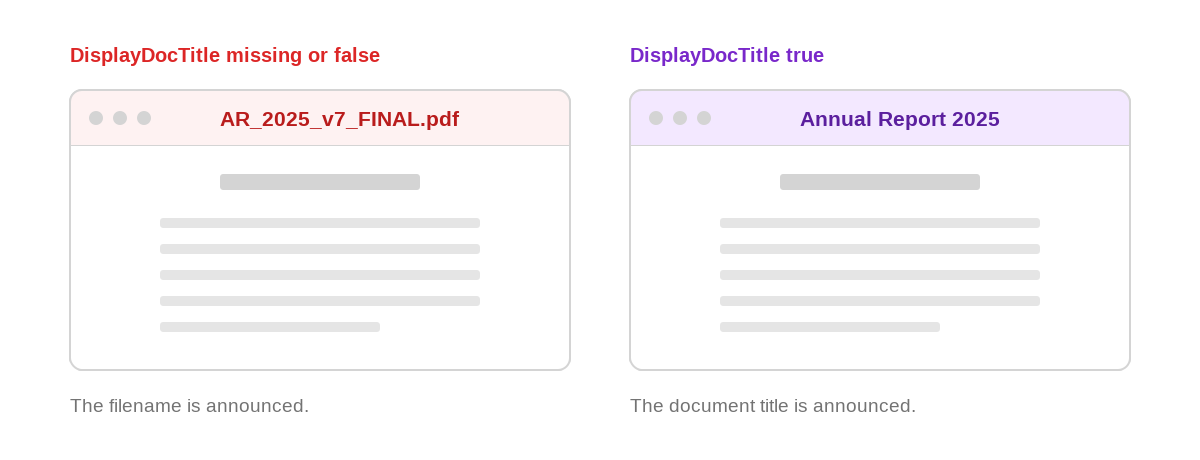
A screen reader user with six documents open tells them apart by their titles. "AR underscore 2025 underscore v7 underscore FINAL dot pdf" is not much help.
Why it happens
Most authoring tools leave the switch off by default. InDesign's export dialog sets "Display Title" to the filename unless you change it. Many PDF libraries and print drivers never write the key at all. It is one of the most frequent results in a validation report for that reason, and one of the quickest to clear.
How to confirm it
In Acrobat, open File, Properties and go to the Initial View tab. Under Window Options, "Show" reads either "File Name" or "Document Title".
How to fix it
In Acrobat
- Open File, Properties.
- On the Description tab, check that Title holds a real title. If it is empty or contains something like "Microsoft Word - draft3.docx", write a proper one.
- On the Initial View tab, set "Show" to "Document Title".
- Save the file.
At the source
- InDesign: set the title in File Info. In the export dialog, under Advanced, set "Display Title" to "Document Title".
- Word: set the title under File, Info. Export with the option to include document properties.
- LaTeX: with
hyperref, use\hypersetup{pdftitle={Your title}, pdfdisplaydoctitle=true}.
Two neighbours to fix at the same time
- 06-003, "Metadata stream does not contain dc:title". The title has to exist in the file's XMP metadata, not only in the older document information fields. Setting it in Acrobat writes both.
- 06-004, "dc:title does not clearly identify the document". This one needs a human. A validator cannot tell that "Document1" is not a title.
How PDFxt handles it
PDFxt adds the metadata a PDF/UA file needs during remediation, including the document title, and you can review and edit the title in the document's properties before export. Whether the title describes the document is still for a person to judge.
Related
- W3C technique PDF18: Specifying the document title.
- veraPDF PDF/UA-1 profile, rules 7.1-9 and 7.1-10.