What the validator is telling you
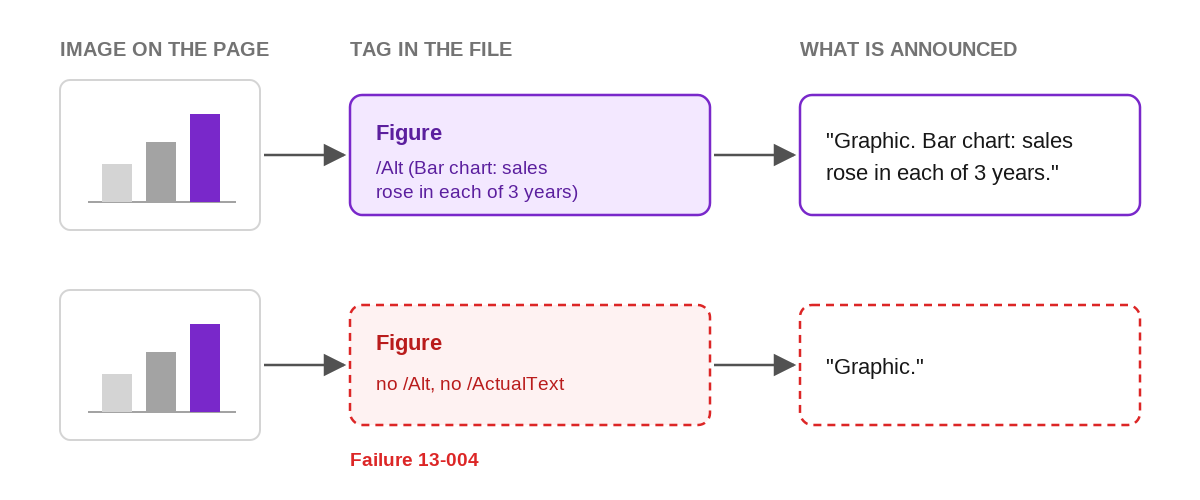
A Figure element in the tag tree has neither an alternate description (Alt) nor replacement text (ActualText). PDF/UA-1 clause 7.3 requires one or the other on every Figure. The check is automatic and reports each figure separately.
The validator only checks that text is present. It does not judge whether the text is any good. A figure whose alt text is "image1.png" passes this check and still fails the reader.
What a reader experiences
A screen reader announces "graphic" and moves on. If the image is a chart that carries the argument of the page, the reader has lost the argument. If the image is a decorative rule, they have been interrupted for nothing.
Why it happens
- Alt text was never written in the source document, and the export tagged the image anyway.
- An auto-tagging step created Figure tags and left the descriptions for later.
- Decorative images were tagged as figures when they should have been artifacts.
- A drawing made of many small vector pieces was tagged as many figures, each needing its own text.
How to confirm it
In Acrobat, open "Prepare for accessibility" and choose "Add alternate text". It steps through every figure and shows which ones are empty. In the Tags panel, the same information is under each Figure tag's properties.
How to fix it
First decide what each image is. That decision matters more than the tool.
- It carries information: write alt text that says what the image is for, in the context of the page. For a chart, state the finding, not the chart type.
- It is decoration: remove the Figure tag and mark the content as an artifact. Do not write alt text such as "decorative line".
- It is a picture of text, such as a logo or a scanned heading: use replacement text (ActualText) containing exactly the words shown.
At the source
- Word: right-click the image and choose "View Alt Text". Tick "Mark as decorative" for decoration.
- InDesign: select the frame, open Object Export Options, and fill in Alt Text. For decoration, use the Tagged PDF tab and apply the Artifact tag.
In Acrobat
- Use "Add alternate text" and type a description for each figure, or tick "Decorative figure".
- For a drawing in many pieces, select the pieces with the reading order tool and tag them as one figure before describing it.
W3C's technique PDF1 covers alt text, and PDF4 covers decorative images.
How PDFxt handles it
PDFxt tags images during remediation and lets a reviewer read and edit the alt text for each one in its editor before export. Treat any generated description as a draft: only someone who knows the document can say what an image is there to show.
Related
- Failure 17-002, "Formula tag is missing an Alt attribute", is the equivalent for equations.
- WCAG 2.1, Understanding Success Criterion 1.1.1: Non-text Content.