For many production teams, an EPUB is finished when EPUBCheck reports no errors. A clean result has become the definition of done. For ebooks sold in the EU, the European Accessibility Act has added a second question, and EPUBCheck was never built to answer it.
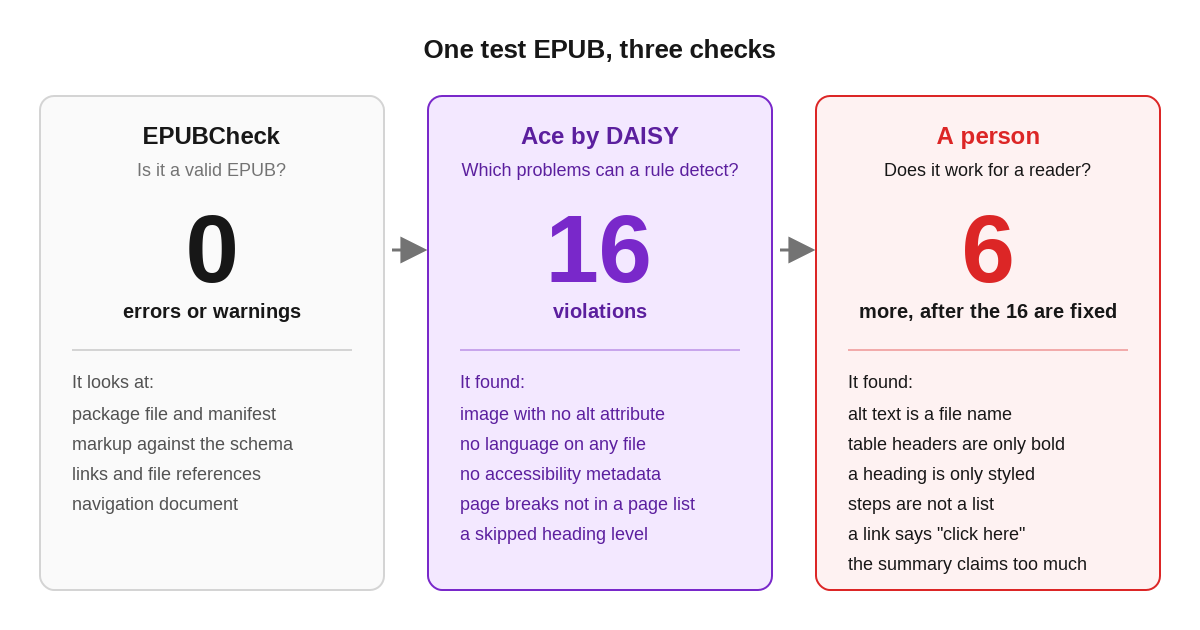
We made one small EPUB and put it through three checks in turn, to show what each one sees.
The test file
The file is a two-chapter EPUB 3 with a table of contents, one chart, one table, page markers and a short list of steps. We built it the way many converted files arrive: valid markup, and nothing more than the markup needs.
Check one: EPUBCheck
EPUBCheck is the official validator for the EPUB format, published by the W3C. We ran version 5.4.0:
$ epubcheck flood-handbook-1-as-delivered.epub
Validating using EPUB version 3.4 rules.
No errors or warnings detected.
Messages: 0 fatals / 0 errors / 0 warnings / 0 infos
That result is correct. The package file is complete, the markup follows the schema, every link resolves and the navigation document is well formed. EPUBCheck tests whether a reading system can open the file. DAISY's own testing guide says of it: "Although this tool does not specifically perform accessibility checks, it ensures that publications are valid to the EPUB standard."
Check two: Ace by DAISY
Ace is the DAISY Consortium's free accessibility checker for EPUB. It tests the requirements of the EPUB Accessibility specification that a rule can decide. We ran version 1.4.6 on the same file. It reported 16 violations: 1 critical, 9 serious and 6 moderate.
| Ace rule | Count | What is wrong |
|---|---|---|
image-alt (critical) | 1 | The chart has no alt attribute |
html-has-lang (serious) | 3 | No content file declares its language |
epub-lang (serious) | 1 | The package file declares no language |
metadata-accessmode, metadata-accessibilityfeature, metadata-accessibilityhazard (serious) | 3 | The three required accessibility metadata properties are missing |
metadata-accessmodesufficient, metadata-accessibilitysummary (moderate) | 2 | The two recommended properties are missing |
epub-pagelist-missing-pagebreak (serious) | 2 | The page markers are not listed in a page list |
epub-type-has-matching-role (moderate) | 3 | Page markers and the table of contents have no ARIA role |
heading-order (moderate) | 1 | An h4 follows an h1 |
None of these stops the file from opening, which is why EPUBCheck is silent about all 16. Each one costs a reader something. Without a language, a screen reader guesses the pronunciation. Without a page list, a student cannot go to the page a lecturer cites. Without metadata, a retailer has nothing to show a buyer who needs to know whether the title will work for them. EPUB Accessibility 1.1 makes three of those metadata properties a requirement for every EPUB, accessible or not.
Check three: a person
We then fixed all 16 violations in the quickest way available, the way a script or a hurried operator would. Both tools now pass the file:
$ epubcheck flood-handbook-2-rules-pass.epub
No errors or warnings detected.

$ npx @daisy/ace -o report flood-handbook-2-rules-pass.epub
info:    - nav.xhtml: No issues found
info:    - ch2.xhtml: No issues found
info:    - ch1.xhtml: No issues found
info:    - EPUB/package.opf: No issues found
Reading the file finds six problems that neither report mentions:
- The alt text is a file name. The chart now has
alt="chart.png". The rule asks for an attribute, and it has one. - The table has no header cells. The first row is bold text in ordinary cells. A screen reader announces "1.2 metres" with no column name.
- A heading is only styled. "Before you leave the site" is a bold paragraph, so it is missing from heading navigation.
- The steps are not a list. Three paragraphs begin with typed numbers. Nothing tells a reader that there are three steps or where they end.
- A link says "click here". Read out of context, in a list of links, it says nothing about where it goes.
- The metadata claims too much. The file declares alternative text as a feature, and its summary reads "This publication meets accessibility requirements". Both tools accept the statement. Neither can test whether it is true.
DAISY describes this limit plainly in its guidance on validation: "a machine can detect whether an image has alternative text, but only a human can verify if the text is sufficiently meaningful." Its guide to manual testing is more direct: "a claim of conformance cannot be made only from automated testing."
The corrected file, and one lesson from making it
The third file fixes those six as well: a real description of the chart, header cells with scope, a real heading, an ordered list, link text that names its target, and metadata that describes what the file contains. It passes both tools, as file two did. The reports for files two and three are identical. Only one of the files is accessible.
Our first attempt at the corrected file passed Ace and failed EPUBCheck. We had labelled the navigation elements with an aria-labelledby attribute, and EPUBCheck 5.4.0 rejected it with error RSC-005: attribute "aria-labelledby" not allowed here. An accessibility fix can break validity, so run both tools again after every round of changes.
A workflow that covers all three
- Run EPUBCheck. Nothing else matters until the file is valid.
- Run Ace. Fix what it reports, then run EPUBCheck again.
- Use Ace's report for the manual review. Besides violations, the HTML report has an Images tab that lists every image beside its alt text, and an Outlines tab that sets the heading structure beside the table of contents. Reading those two tabs catches the first and third problems above in minutes.
- Open the book and listen. Read one chapter in a reading app with a screen reader. Walk one table. Follow one link out of context.
- Read the metadata as a reader would. Every feature the file declares should be true of the whole title.
For a full manual procedure, DAISY's Ace SMART tool walks a reviewer through the checks that need judgement and records the result. A conformance statement in the metadata, such as "EPUB Accessibility 1.1 - WCAG 2.2 Level AA", is a claim that somebody did that review.
Where ePUBxt fits
ePUBxt takes existing EPUB files and returns them remediated. It fixes validity and accessibility errors automatically, repairs structure and navigation including the table of contents, page lists and landmarks, generates alt text and image descriptions, completes the accessibility metadata, and returns a compliance report from both EPUBCheck and Ace by DAISY with each file. That covers checks one and two, and it gives the reviewer in check three a description to edit where there was an empty attribute. As file two shows, whether a description says the right thing remains a decision for someone who knows the book.
Repeat the experiment
The three files: 1, as delivered, 2, rules pass and 3, corrected. An EPUB is a zip archive, so you can unpack each one and compare the markup.
epubcheck flood-handbook-1-as-delivered.epub
npx @daisy/ace -o report flood-handbook-1-as-delivered.epub
PDFs have the same gap between a clean report and a usable file. We ran the equivalent test in Passed the validator, failed the reader.
Sources
- W3C: EPUB Accessibility 1.1, section 2.2 on package metadata and section 3.5.2 on conformance statements
- W3C: EPUBCheck
- DAISY: Ace, accessibility checker for EPUB
- DAISY Accessible Publishing Knowledge Base: Validation
- DAISY: Ace SMART user guide