A validation report with no failures is the usual proof that a PDF is accessible. It is what a vendor sends back with the file and what goes into the compliance folder. The report is worth having. It is also only half of the test, and the standard that defines the test says so.
To show where the line falls, we took a PDF that passes, damaged it in five ways that matter to a reader, and validated it again.
The experiment
The test document is one page: a title, three headings, a chart with alt text, three numbered steps and a small table. We exported it from Chromium 156 as a tagged PDF and ran it through veraPDF 1.30 with the PDF/UA-1 profile. It failed one rule out of 106, because the export has no XMP metadata stream. We added one, with the document title and the PDF/UA identifier, and the file passed. These are the summary lines of veraPDF's text and XML reports:
PASS mill-bridge-original.pdf ua1
passedRules="106" failedRules="0" passedChecks="2816" failedChecks="0"
We then made five changes to the tag structure of that file. Nothing on the page was touched.
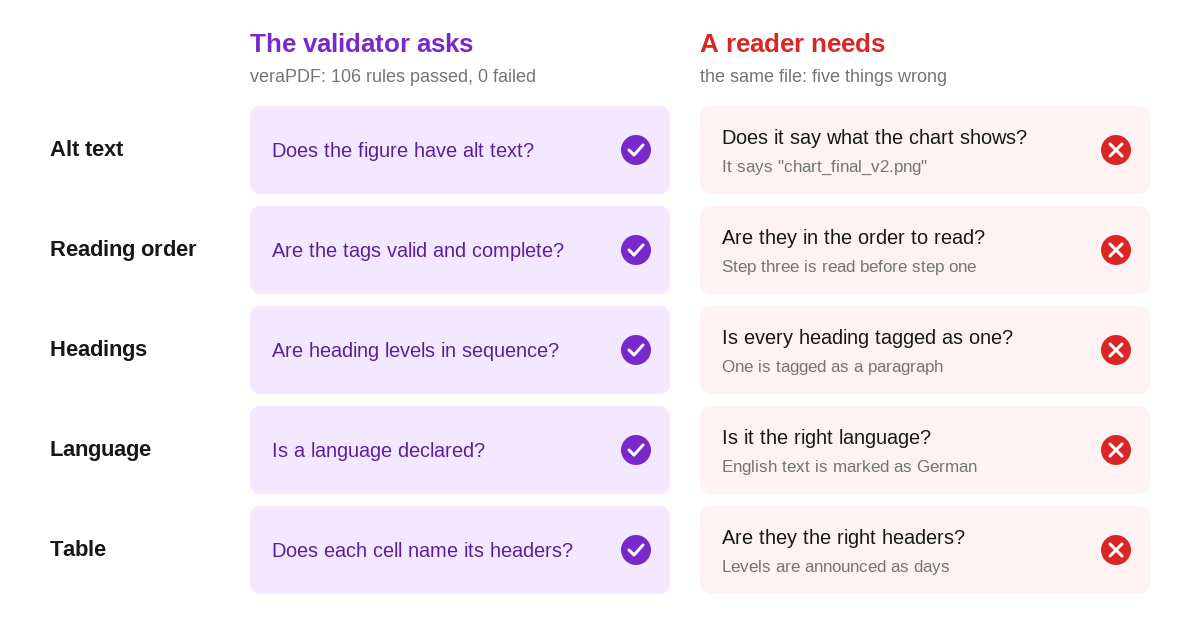
| What we changed | What the validator checks | What a reader gets |
|---|---|---|
The chart's alt text became chart_final_v2.png | That the figure has alt text | A file name where the description of the chart should be |
| The three steps were reordered in the tag tree | That the tags are valid and all content is tagged | "Last, telephone the duty officer" before "First, move all vehicles" |
| One heading was retagged as a paragraph | That heading levels do not skip | A section that cannot be found by heading navigation |
| The document language was set to German | That a language is declared | English text read with German pronunciation |
| The level cells were pointed at the wrong column header | That each cell's header references resolve | "Days above the flood line: 1.2 metres" |
The altered file renders identically. We compared page images of the two files at 150 dpi and found 0 differing pixels. This is the validator's verdict on it, from the same two reports:
PASS mill-bridge-altered.pdf ua1
passedRules="106" failedRules="0" passedChecks="2814" failedChecks="0"
The same 106 rules pass. The only difference in the report is the number of individual checks, which fell by two because there is one heading fewer to test.
What a screen reader receives
This is the tag tree of the original file, printed in reading order by the free pdfinfo tool. Each line shows the tag, then the text or alt text it carries:
Figure ["Line chart of the highest river level in each month. The level is
         1.2 metres in March and 1.3 metres in April, then rises to 2.6
         metres in May, above the flood line at 2.0 metres."]
H2     "What to do when a flood warning is issued"
P      "First, move all vehicles to the upper car park."
P      "Then close the lower gate and switch off the pump house supply."
P      "Last, telephone the duty officer and confirm that the site is clear."
And the same part of the altered file:
Figure ["chart_final_v2.png"]
P      "What to do when a flood warning is issued"
P      "Last, telephone the duty officer and confirm that the site is clear."
P      "First, move all vehicles to the upper car park."
P      "Then close the lower gate and switch off the pump house supply."
We have shortened the output to one line per tag. Both files are linked at the end of this article, so you can run the same commands and open them in a screen reader.
None of the five changes is exotic. Image file names become alt text when a tool fills an empty field. Reading order goes wrong whenever a layout is tagged automatically and nobody reads the result. A heading styled by hand exports as a paragraph. A template set up in one language is reused for another. Table headers are assigned by position and the position is off by one.
The standard already says this
PDF/UA-1 does not come with a pass mark that software can award. The PDF Association's Matterhorn Protocol turns the standard into a list of specific ways a file can fail, and labels each one by how it has to be tested. In version 1.1 there are 137 failure conditions in 31 checkpoints. 87 are marked as testable by machine. 48 are marked as needing human judgement, and two need no specific test.
Four of our five changes land on a condition from the human list:
- Reading order: 09-001, "Tags are not in logical reading order".
- The lost heading: 14-001, "Headings are not tagged".
- The wrong language: 11-007, "Natural language is not appropriate".
- The wrong table header: 01-006, "Type and attributes of a structure element are not semantically appropriate".
Alt text is the fifth. The only failure condition a machine can test is 13-004, "Figure tag alternative or replacement text missing". Whether the text is any use is a WCAG question. Success Criterion 1.1.1 asks for a text alternative "that serves the equivalent purpose", and no software can decide that a description serves the purpose of a chart.
So a validator that passes our altered file is not broken. It tested what it can test. We ran veraPDF. Other checkers have their own rule sets and may differ in detail, but the human-only conditions are outside all of them by definition.
How to check what the validator cannot
These checks need no paid software. Our free PDF accessibility checker shows the first, second, third and fifth of them in your browser, without uploading the file. The steps below do the same with command-line and desktop tools. On a long document, sample: the first pages, every table and figure, and any page with an unusual layout.
- Read the alt text as a list.
pdfinfo -struct file.pdf, from the free Poppler tools, prints the tag tree with each figure's alt text in brackets. A file name, the word "image" or a caption repeated word for word shows up at once. - Read the document in tag order.
pdfinfo -struct-text file.pdfprints the text in the order a screen reader will speak it. The screen reader preview in the free PAC checker shows the same thing with the tag types marked. Our article on multi-column reading order covers the fixes. - Compare the headings with the page. In the same output, every heading on the page should appear as
H1toH6, and nothing else should. With the free NVDA screen reader, press H to jump from heading to heading and see which ones are missed. - Listen to one paragraph. A wrong language is obvious in the first sentence. In Acrobat, the declared language is under File, Properties, on the Advanced tab.
- Walk one row of each table. In NVDA, Ctrl+Alt and the arrow keys move from cell to cell and announce the headers for each. The headers you hear should be the ones you see. Our article on tagging financial tables explains how the links are made.
When a supplier delivers remediated files, ask for both halves: the validator report, and a note of who checked reading order, alt text, headings and tables, and on which pages.
Where PDFxt fits
PDFxt tags the structure of a PDF automatically and validates every export. For the half that no validator covers, its editor shows the reading order, the alt text and the table structure beside the page, so that a person can confirm or correct them before the file goes out. The review step is there for the reason this experiment shows: a clean report says the file is well formed, and only a person can say that it is right.
Repeat the experiment
The two files: mill-bridge-original.pdf and mill-bridge-altered.pdf. You need veraPDF and Poppler.
verapdf -f ua1 --format text mill-bridge-original.pdf mill-bridge-altered.pdf

pdfinfo -struct-text mill-bridge-original.pdf
pdfinfo -struct-text mill-bridge-altered.pdf
To make changes of your own, qpdf can write a PDF out as JSON and read it back. The alt text, the order of a tag's children, the tag type and the document language are all plain values in that file.
qpdf mill-bridge-original.pdf --json-output edit.json
# edit the values in edit.json
qpdf --json-input edit.json mine.pdf
The same gap exists for ebooks. We ran the equivalent test on an EPUB in EPUBCheck passed. Is the ebook accessible?
Sources
- Matterhorn Protocol 1.1, failure conditions 01-006, 09-001, 11-007, 13-004 and 14-001, and the machine or human marking of each condition
- veraPDF PDF/UA-1 validation profile, 106 rules
- WCAG 2.1, Understanding Success Criterion 1.1.1: Non-text Content
- WCAG 2.1, Understanding Success Criterion 1.3.2: Meaningful Sequence
- WCAG 2.1, Understanding Success Criterion 3.1.1: Language of Page